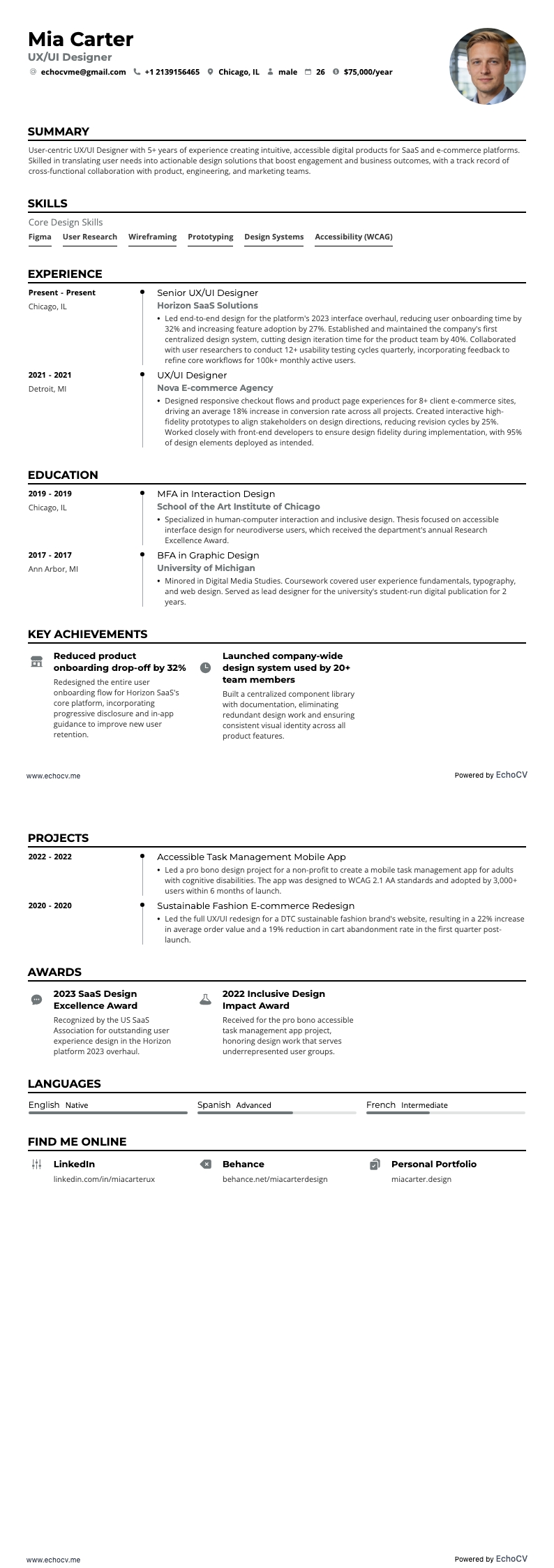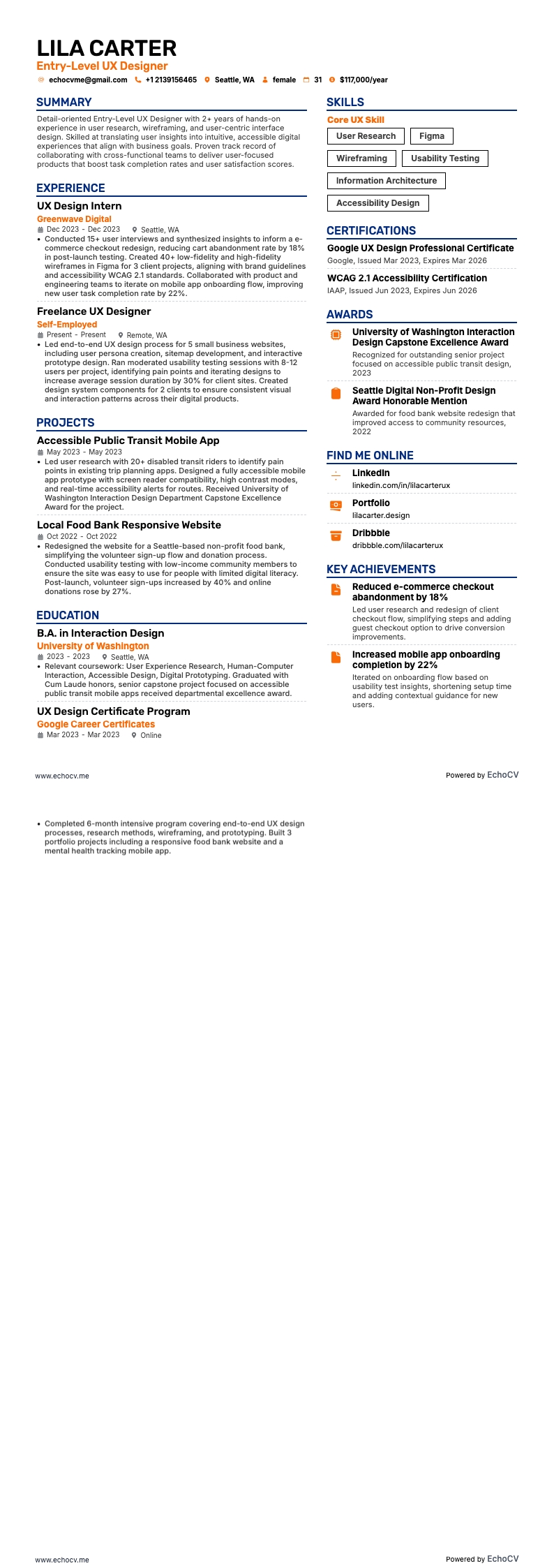
Vista previa completa de Diseñador UX de nivel inicial

9 ejemplos de currículum de diseñador UX

EchoCV

Escrito por el equipo de EchoCV

Actualizado: 6/13/20248 min read

Vea todos los ejemplos de currículum en esta guía o genere su propio ejemplo con su prompt personalizado

Diseñador UX de nivel inicial example resume
Diseñador UX de nivel inicial

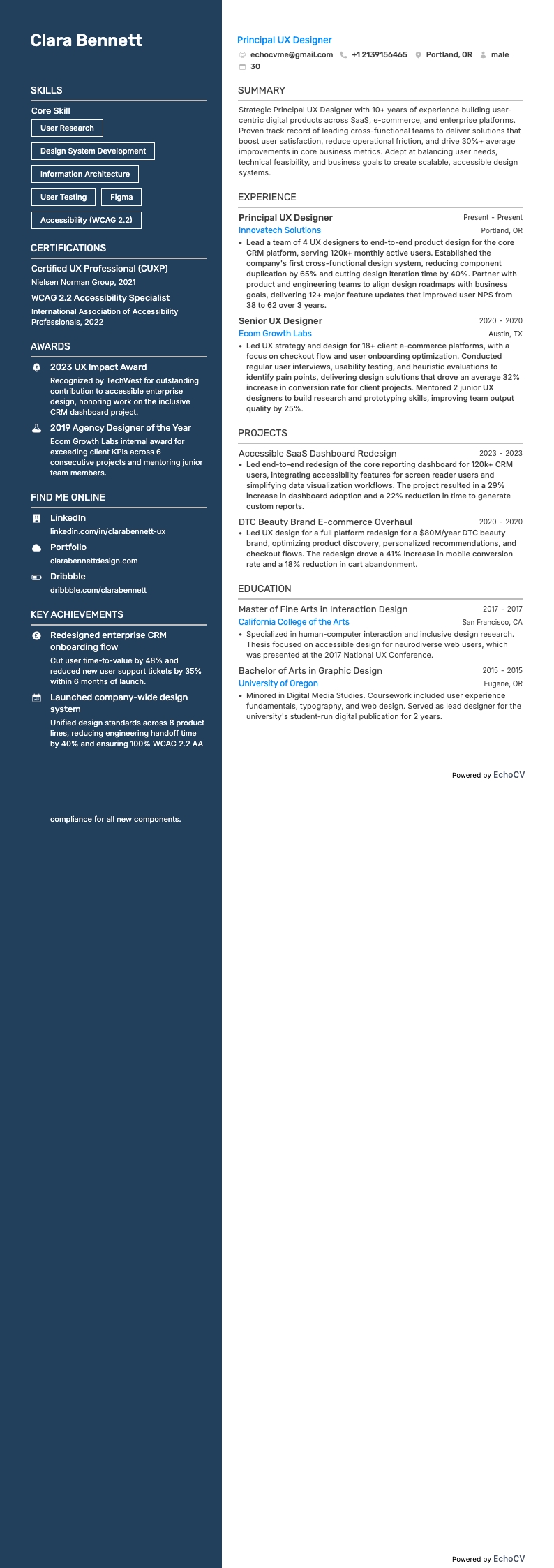
Diseñador/a UX principal example resume
Diseñador/a UX principal

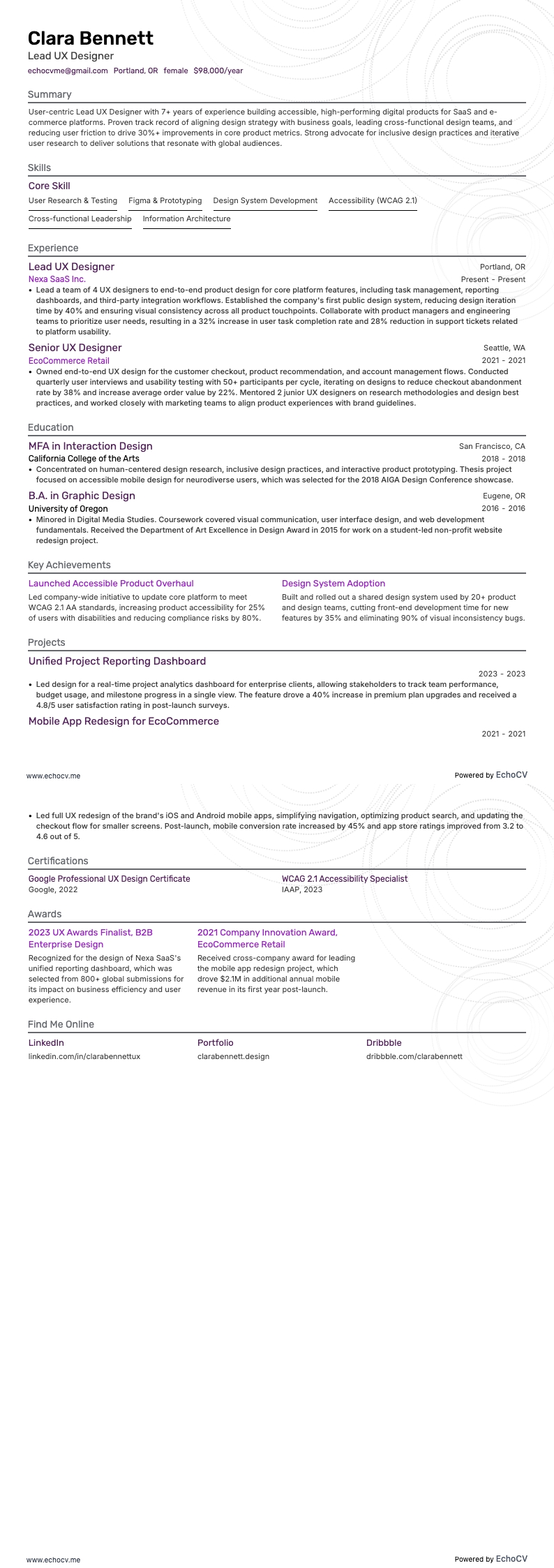
Diseñador/a UX principal example resume
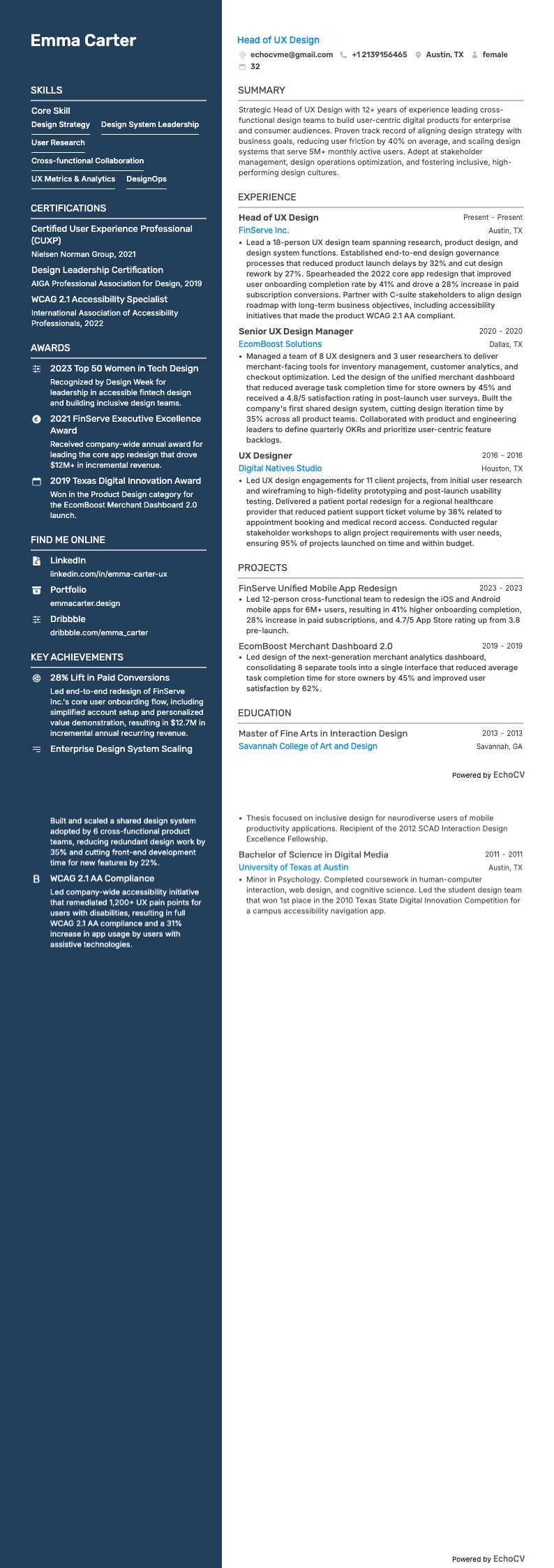
Diseñador/a UX principal

Director de Diseño UX example resume
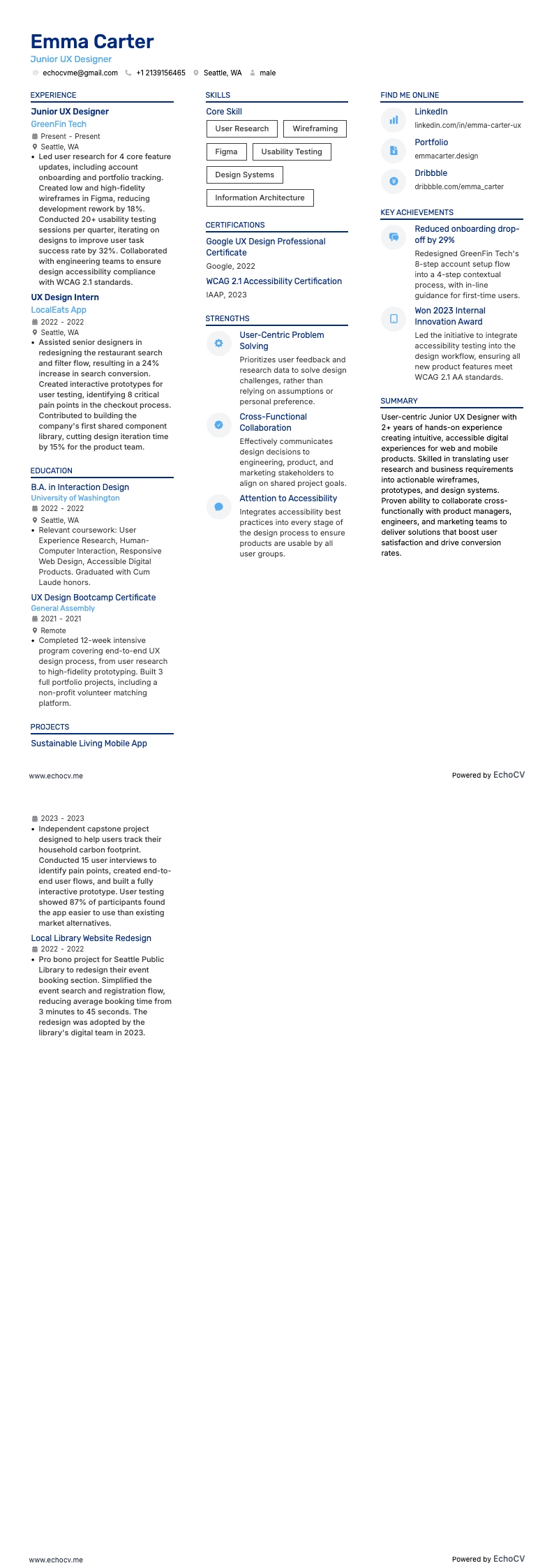
Director de Diseño UX

Diseñador UX junior example resume
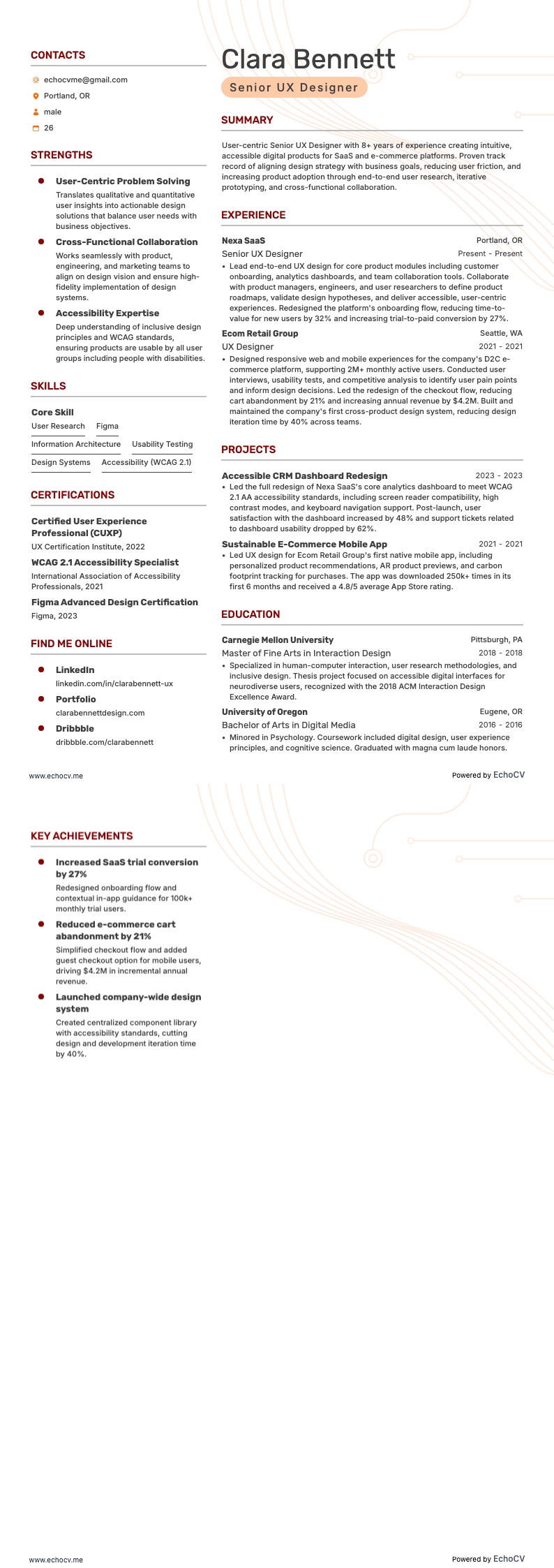
Diseñador UX junior

Diseñador UX sénior example resume
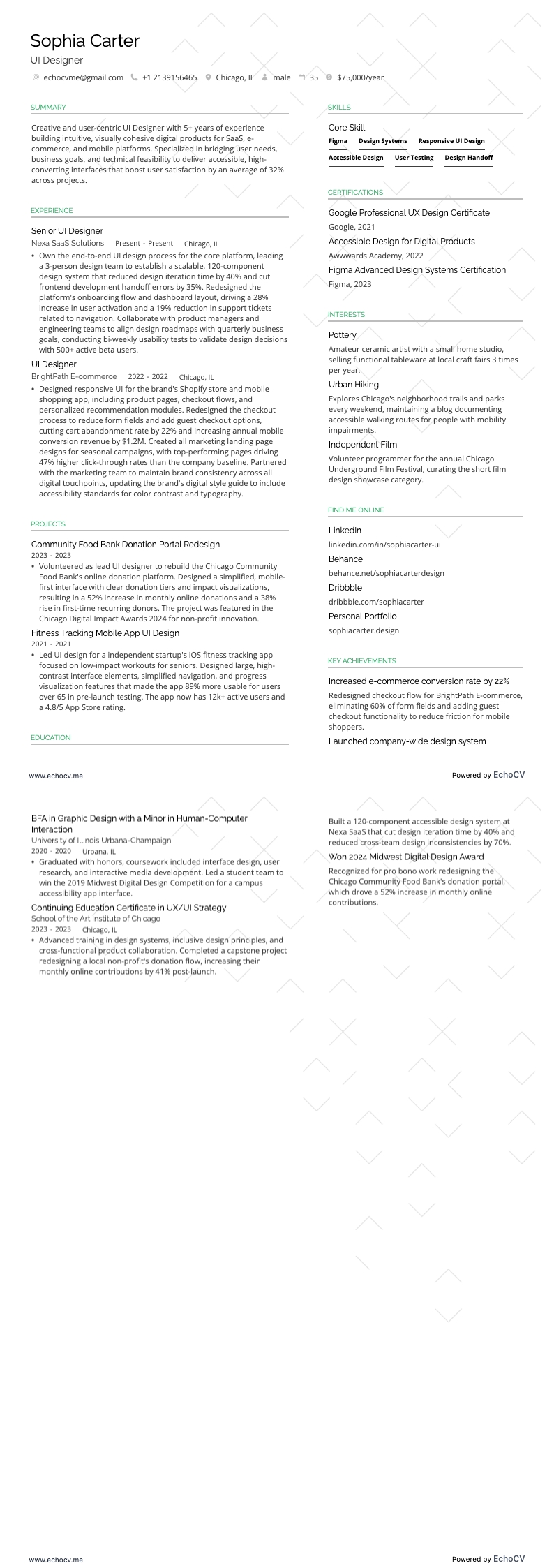
Diseñador UX sénior

Diseñador UI example resume

Diseñador UI

Diseñador UX/UI example resume

Diseñador UX/UI

Great UX designers make complexity feel simple—but if your resume doesn’t show the user and business impact behind your work, it won’t stand out. As the person shaping user journeys, accessibility, and business results, your work drives both satisfaction and revenue.

According to the UX Design Institute (2026), companies that prioritize user experience outperform competitors by up to 2× in revenue growth. This proves that great UX isn’t just about visuals, but measurable business advantage.

At Echocv, we’ve helped thousands of UX designers turn responsibilities into results and results into interviews. In this guide, you’ll find nine UX designer resume examples and templates, plus step-by-step tips on format, content, and metrics that get noticed in 2026.

Key takeaways

  • Lead with reverse-chronological or hybrid format to surface project outcomes fast.

  • Quantify results (activation, conversion, task success, time-on-task, support tickets).

  • Mirror JD methods/tools (research type, Figma, analytics) and prove them with numbers.

  • Keep portfolio & LinkedIn visible in the header—link one to three top case studies.

  • Use Echocv to tailor and generate stronger bullets—then export ATS-friendly PDFs.

  • Keep it to one page if under ten years’ experience—add Achievements for awards or speaking.

Explore these UX designer resume examples to see how top professionals highlight user impact, collaboration, and delivery speed.

How to choose the best UX designer resume format

Use reverse-chronological resume format if you have 2+ years—if you’re junior or pivoting, choose a hybrid—and skip purely functional.

Quick decision table

ProfileBest formatWhy it works
Experienced (2+ years)Reverse-chronologicalShows growth, scope, and shipped outcomes in context
Junior or pivotHybridSurfaces skills first with concise experience evidence
Purely functionalAvoidHides timeline and product accountability

Resumen

Answer: Reverse-chronological.

Do:

  • Lead each role with scope, team, and product.
  • Use outcome bullets with one metric and one timeframe.

Example bullet:

  • “Reduced checkout errors 28% in 8 weeks by fixing validation and labels.”

Resumen

Answer: Hybrid (skills + condensed experience).

Do:

  • Put a focused Skills block above Experience.
  • Map each key skill to one outcome from projects or internships.

Example scaffold:

  • “Prototyping (Figma) → validated flow; task success +19% after two rounds.”

Resumen

Answer: It drops timeline context, which weakens accountability and impact tracing.

Use instead:

  • Keep a visible timeline.
  • Group skills, then prove them with dated outcomes.

What sections should go on a UX designer’s resume?

  • Header (name, title, contact, portfolio, LinkedIn)
  • Summary
  • Professional Experience (three to six bullets each, depending on your level of experience)
  • Skills (hard and soft)
  • Education
  • Certifications
  • Optional: Awards, Publications/Speaking, Projects, Volunteering, Tools

Once your format and resume sections are set, run a quick check to confirm readability and applicant tracking system (ATS) parsing.

With your resume layout locked, focus your experience section on problems solved, methods used, and the outcomes you shipped.

How to write your UX designer resume experience

Your experience section should make your design process and results easy to scan. Each entry needs to tell a complete story—what you worked on, how you did it, and what changed because of it.

Follow this standard format for each role:

  • Job title (e.g., UX Designer, Product Designer)
  • Company name and location (include Remote if applicable)
  • Dates of employment (month and year)
  • Three to five bullet points showing your scope, methods, tools, and measurable outcomes

Keep bullets concise and structured—here’s a common formula:

Action verb + design activity + measurable outcome

Use consistent punctuation, spacing, and tense (past tense for completed work, present tense for current roles).

Resumen

  • Scope: audience, platform (web, iOS, Android), domain (SaaS, e-commerce, FinTech)
  • Methods: discovery, usability testing, IA, wireframes, prototypes
  • Tools: Figma, FigJam/Miro, Maze, UserTesting, GA4, Amplitude, Jira
  • Outcomes: activation ↑, conversion ↑, drop-off ↓, task success ↑, tickets ↓
  • Systems & accessibility: design tokens—WCAG 2.2 AA compliance

Why do numbers matter? Studies show that optimizing UX and interface design can increase conversion rates by up to 400%, while checkout improvements alone can lift sales by 35%. Adding results like these to your bullets makes your impact impossible to ignore.

Good example of a UX designer experience section

UX Designer

BrightCart | Remote

2021 – Present

  • Redesigned mobile checkout—conversion +11%, cart drop-off −15% after 3 testing rounds (n = 18).
  • Built design-system tokens in Figma—UI defects −27%, delivery speed +22% across 4 squads.
  • Led mixed-methods research (survey n = 612 + 12 interviews)—prioritized roadmap with PM via RICE—support tickets −18% QoQ.
  • Upgraded core flows to WCAG 2.2 AA—achieved full keyboard and color-contrast compliance.

Once you’ve structured your bullets with measurable outcomes, you’re ready to refine them for precision and alignment with the specific job description.

How to tailor your UX designer resume experience

Once your experience entries are structured and results-driven, the next step is tailoring them to the job description. Recruiters and ATS software scan your resume for overlap with the company’s methods, tools, and performance metrics. If your bullet points reflect those, you’ll appear instantly relevant.

Tailoring goes beyond adding keywords—it’s about echoing the employer’s priorities and proving you can succeed in their workflow.

Here are several effective ways to tailor your UX designer resume experience:

  • Mirror methods from the posting (generative research, usability testing).
  • Use the same tools they mention (Figma, Jira, GA4, Amplitude).
  • Match platforms and domains (iOS, Android, SaaS, e-commerce).
  • Quantify outcomes they track (activation, conversion, NPS/CSAT, retention).
  • Mention accessibility if noted (WCAG 2.2 AA).
  • Use the same metrics and phrasing the company uses in its JD.

Here’s a sample job posting and how to match your bullets to it.

UX designer job description from a real-style posting

  • “We’re seeking a UX Designer to improve onboarding and mobile workflows. You’ll conduct user research, produce prototypes in Figma, test iteratively, partner with PM/ENG, and drive activation and adoption across platforms. Experience with analytics (GA4/Amplitude) and WCAG 2.2 AA is required.”

Below are examples of how UX designers turn vague bullets into high-impact achievements that directly match the job description.

Resume tailoring examples for UX designers

Job description excerptUntailored bulletTailored bullet
“Figma + design system—multi-team scale.”Built UI components.Built Figma tokens + components—UI defects −27% , delivery +22% across 4 squads.
“Analytics-driven iteration.”Checked analytics.Instrumented events in GA4/Amplitude —weekly funnel reviews— activation +19% post-iteration.
“Mobile onboarding improvement.”Designed onboarding screens.Ran 3 moderated tests (n = 18)— onboarding conversion +7% , time-to-value −32%.
“Accessibility (WCAG 2.2 AA).”Considered accessibility.Delivered AA contrast + focus states— keyboard coverage 100% .
“Research + testing cadence.”Helped with research.Led 12 interviews + survey (n = 612)—prioritized fixes → support tickets −18% .

CONSEJO PRO

Tailoring proves fit for both ATS and hiring managers. Use Echocv’s one-click tailoring to paste a JD and auto-update bullets, skills, and sections—without rewriting from scratch.

Once your resume reflects the right language and skills from the job post, make your results unmistakable by quantifying them. Use data to give recruiters confidence in your impact.

How to quantify your experience on a UX designer’s resume

Numbers make your impact clear. They show project scale, decision quality, and measurable results. Quantifying turns artifacts into proof.

Examples of how to quantify a UX designer’s achievements on your resume

How to quantifyExample bullet point
Activation or conversion“Onboarding redesign lifted activation by + 19% and conversion by +7% .”
Task success/time-on-task“Improved task success by +24%—reduced time-on-task by 31% after 3 test rounds.”
Support/usability issues“Cut monthly support tickets by 18% by fixing top usability gaps.”
Design system impact“Introduced tokens— handoff time by 22%, UI defects by 27% across 4 teams.”
Accessibility“Achieved WCAG 2.2 AA —color contrast + focus coverage 100% on core flows.”

Each example shows how numbers transform duties into results. If you’re unsure how to phrase yours, try our tool below.

With impact metrics in place, reinforce your fit with a focused skills section that matches the role and platform.

How to list your hard and soft skills on your UX designer resume

Skills on your resume help recruiters and ATS see your methods, tool fluency, and collaboration strengths at a glance.

Place skills near the top if you’re junior or pivoting—after work experience if you’re mid/senior.

Let’s look at the core technical and interpersonal skills that set great UX designers apart.

Best hard skills for a UX designer’s resume

  • User research
  • Usability testing
  • Information architecture, flows, wireframes, prototypes
  • Design systems & tokens
  • Interaction design & motion basics
  • Accessibility
  • Analytics
  • Experimentation
  • Content design fundamentals
  • Front-end familiarity

Next, show your soft skills in action—through outcomes in your summary and experience.

How to showcase your soft skills on a UX designer’s resume

The soft skills you listed earlier—like collaboration, empathy, and communication—should appear through your actions, not just as labels. Show them in context by linking them to team outcomes or user feedback.

Resume summary

Summary

Senior UX Designer with 9+ years of experience in B2B SaaS and e-commerce platforms. Known for strong collaboration and clear communication across design, engineering, and product teams. Facilitated cross-functional discovery and usability testing that improved onboarding activation by 19% and reduced drop-off by 15%. Recognized for empathy, active listening, and conflict resolution skills that foster team alignment and raise NPS by +9 post-launch.

Professional work history

Work Experience

UX Designer

BrightCart | Remote

2021 – Present

  • Partnered with PM/ENG to run design sprints—time-to-decision −30%; delivery +18%.
  • Mentored 3 junior designers—instituted crit rituals that cut rework by 22%.
  • Presented quarterly UX roadmap to execs—secured buy-in for WCAG 2.2 AA upgrades.

Once your skills are in place, the next step is showcasing your education and certifications so recruiters instantly see your foundation and continued learning.

How to list your certifications and education on your UX designer resume

Your education and certifications confirm that you have the fundamentals of design, research, and usability. They also show that you stay current with evolving tools, standards, and methodologies. Recruiters often scan these sections to verify your qualifications and continuous learning mindset.

Keep your education entry concise and consistent across roles.

Include the following:

  • Degree name: For example, Bachelor of Science in Human–Computer Interaction or Master’s in UX Design
  • Institution name: Full name of the university or design school
  • Location: City and state (or country if international)
  • Graduation year: Only the year—omitting the month keeps it clean
  • GPA: Include only if it’s 3.5 or higher and if you’re a recent graduate (within the last two years)
  • Honors: Add distinctions like cum laude, magna cum laude, or Dean’s List
  • Relevant coursework: Optional for early-career designers—highlight UX-related classes like Interaction Design, Usability Testing, Information Architecture, or Human Factors

Education entry sample

B.S. Human-Computer Interaction

Ohio State University | 2021

  • Honors: Cum laude, Dean’s List (4 semesters)
  • Relevant coursework: Research Methods, Information Architecture, Accessibility, Prototyping Studio

Certifications show that you continue learning and adapting to new tools, standards, and frameworks. This is especially important in UX, where technology and design systems evolve quickly.

Each certificate entry should include:

  • Certification title: E.g., Google UX Design Certificate
  • Issuing organization: Name of the platform or institution (e.g., Coursera, Nielsen Norman Group, Interaction Design Foundation)
  • Issue date: Month and year (omit if unknown or has no expiration)
  • Expiration date: Only if applicable
  • Credential ID or URL: Optional, but useful if verifiable online

CONSEJO PRO

  1. List education before certifications if you’re early in your UX career.
  2. Switch the order if your certifications are more recent or advanced.
  3. Keep both sections concise, scannable, and free of visual clutter.
  4. Use consistent formatting and avoid excessive decorative elements or icons.

With your education and certifications in place, the next step is crafting a summary that instantly communicates your expertise, personality, and impact.

How to write your UX designer resume summary

Your summary is your first proof that you deliver outcomes—not just design artifacts. In two to four lines, show measurable results and context.

A strong UX summary should:

  • State your current title and years of experience.
  • Highlight domain/platform focus (SaaS, e-com—iOS/Android/web).
  • Mention methods/tools (research/testing, Figma, analytics).
  • Include one to two quantified results (activation, conversion, tickets).
  • Convey soft skills via real impact (alignment, facilitation, trust).

Example summary

UX designer with 6+ years in B2B SaaS and mobile e-commerce. Led research, prototyping, and testing in Figma and Maze to improve onboarding. Increased activation by 19% and reduced support tickets by 18%—improved delivery by 22% by scaling design-system tokens and advanced accessibility to WCAG 2.2 AA.

Write your summary in first person without pronouns—for example, “Led cross-functional discovery” instead of “She led.”

This keeps the tone confident, professional, and personal without sounding informal.

If you’re just starting your UX career, you can still craft a strong resume by focusing on projects, training, and measurable outcomes.

How do I write a UX designer resume with no experience?

Even without years of employment, you can create a standout resume that demonstrates readiness. Focus on education, projects, and transferable skills from internships or freelance work.

What to include in place of a full-time UX experience:

  • Case studies: Problem → methods → prototype → outcome.
  • Research work: Participants, methods, top insights, and how design changed.
  • Internships / freelance / volunteer: Show delivery and collaboration.
  • Bootcamps / certifications: NN/g, Google UX, IDF, accessibility courses.
  • Projects: Include personal or academic UX projects that demonstrate end-to-end process, testing, and iteration.
  • Awards: Note design competitions or recognitions (e.g., UX Design Awards, Awwwards, hackathons) that validate your creativity and execution.

Resumen

A hybrid format works best. Place skills, certifications, and portfolio links on top, followed by projects and experience—so you look job-ready even before your first full-time role.

With the essentials covered, here are quick answers to the questions UX candidates ask most.

Frequently asked questions about UX designer resumes and job applications

Every UX path looks different—these answers cover formatting details, portfolios, certifications, and how results tie to level and pay.

What should your UX designer resume header include?

Include the following elements in your header:

  • Resume headline: A short line under your name (e.g., UX Designer | Data-Driven, Human-Centered Design) that defines your focus and helps recruiters spot your fit instantly.
  • Full name: Use your preferred professional name (e.g., Avery Lee or Avery J. Lee). Avoid nicknames or handles.
  • Job title: Tailor it to your target role (e.g., UX Designer, Product Designer, or UX Researcher). This helps align with ATS searches and recruiter expectations.
  • Location: Include your city and state/country (e.g., Austin, TX or Berlin, Germany). If you’re open to remote work, add Remote or Open to relocation.
  • Phone number: Use a personal, professional number with international code if applicable (e.g., (512) 555-01XX).
  • Professional email address: Use a clean, recognizable address (e.g., [email protected]). Avoid quirky or outdated usernames.
  • Portfolio link: Essential for UX designers. Add your personal portfolio website or a curated Behance, Dribbble, or Notion link that showcases two to three strong case studies.
  • LinkedIn profile: Use a custom slug (e.g., linkedin.com/in/name). Ensure it matches your resume and includes a professional photo and updated experience.

INDUSTRY STATS

    • Optional link (one max): Add one publication, case study, or interview that supports your expertise—but avoid cluttering your header with multiple links.
    Resume header example

    Avery J. Lee

    Senior UX Designer | Creating Data-Driven, Human-Centered Digital Experiences

    Austin, TX • Open to Remote • (512) 555-01XX • [email protected]

    nameux.com • linkedin.com/in/name • medium.com/@name

    What design rules should you follow for a UX resume?

    Your resume design is your first usability test—it should be clear, accessible, and ATS-friendly. Think in terms of hierarchy, whitespace, and readability, just as you would in a product interface.

    Follow these key design principles:

    • Length: One page if under ten years of experience. Two for senior roles with measurable results.
    • Margins: One inch on all sides for balanced spacing.
    • Spacing: Single or 1.15 line spacing for compact readability.
    • Fonts: Use modern, legible sans-serifs—Inter, Lato, Roboto, or Montserrat with 10–12 pt for body text and 14–16 pt for resume headings.
    • Color: One accent color only—avoid heavy backgrounds or gradients.
    • Layout: Single- or two-column layouts both work. Use a single column for the best reliability, or two columns when built with plain text, primary content on the left, and a clean top-to-bottom reading order.
    • Alignment: Left-align text—avoid centered or justified blocks.
    • Visuals: Skip photos, icons, and decorative elements unless requested to keep the résumé accessible, ATS-readable, and easy to scan. Prove your visual craft in the portfolio instead.
    • Accessibility: Ensure strong contrast, consistent hierarchy, and readable structure.

    How should you save and name your UX resume file?

    Use a descriptive name like:

    “FirstNameLastNameUXDesignerResume.pdf”

    This way, recruiters can identify your file instantly.

    What should a UX cover letter include?

    Explain in your cover letter why this product or user problem excites you, include one–two quantified results, and note how you’ll partner with PM and Engineering. Add one link to your top case study in the first paragraph (after the results), and use the same contact header (name, title, email, portfolio URL) as your resume.

    How do I show career progression on a UX resume?

    List roles chronologically—highlight growing scope—multi-platform projects, design-system leadership, measurable outcomes.

    What additional sections work well on a UX resume?

    • Awards & Publications: Mention UX awards (like Awwwards, Webby, or UX Design Awards) or published articles on UX methods, case studies, or accessibility, as well as interviews given.
    • Speaking Engagements: Include conference talks, webinars, or workshops at events such as UXDX, NN/g, or local design meetups.
    • Professional Memberships: Add affiliations like the Interaction Design Foundation (IDF), UXPA, or AIGA—they signal ongoing learning and networking.
    • Volunteering: Highlight pro bono design work for nonprofits, accessibility advocacy, or community mentorship programs.
    • Tools & Technology Stack:List the core tools you use daily (e.g., Figma, FigJam, Miro, Maze, GA4, Hotjar, Jira) in a Skills subsection—or, if they’re numerous, in a dedicated Tools section. Reinforce each tool in your experience entries with outcome-focused bullets.

    How technical should my UX resume be?

    Be as technical as needed to prove you can ship with PM and Engineering. Name the tools and standards you actually use (e.g., Figma, GA4, Amplitude, WCAG 2.2, Apple HIG, Material Design) but prove them in experience bullets with measurable results—avoid buzzword lists.

    How do salaries tie to my resume?

    Salaries correlate with scope and results. Portfolios that show measurable impact (activation, conversion, accessibility, retention) support stronger levels and compensation bands.

    Portfolio and cover letter considerations

    Your portfolio and cover letter complement your resume, not duplicate it. Your resume gives context—your portfolio shows process and results—your cover letter connects both to the company’s mission.

    Resumen

    • Cover letter: Address a person by name when possible. Reference one or two projects from your portfolio that directly relate to the role.
    • Tone: Your cover letter should expand on your motivation, not repeat your resume bullet points.
    • Formatting: Double-check for misspellings, consistent spacing, and a matching font style when submitting multiple documents.
    • File names: Save files clearly (e.g., Avery_Lee_UX_Designer_Resume.pdf and Avery_Lee_Cover_Letter.pdf).

    Together, your resume, portfolio, and cover letter tell a unified story: your skills, process, and professional voice.

    Common mistakes to avoid

    Avoid these common UX resume mistakes that can undermine your presentation:

    Frequent UX resume mistakes:

    • Submitting a two-page resume when one page would do.
    • Overusingdecorative fonts or color-heavy templates that distract from content.
    • Overloading the resume with visuals instead of measurable results.
    • Leaving typos, spacing inconsistencies, or misalignments that suggest carelessness.
    • Listing outdated tools or irrelevant early projects.
    • Forgetting to test your PDF for formatting errors or broken links.

    Treat your resume like a design deliverable—test it on multiple screens and PDF readers. Every pixel should reflect your attention to detail.

    CONSEJO PRO

    A resume isn’t a Behance shot—it’s a usability test of your communication. Keep it structured, accessible, and readable on any screen.

    In conclusion

    Your UX resume should read like a shipped release—a clear problem, a thoughtful process, and a measurable result. Use storytelling and data to prove that your design decisions drive both user satisfaction and business growth.

    Create your next opportunity with Echocv’s free AI Resume Builder. In minutes, you can generate a personalized, ATS-ready UX resume that highlights your design process, results, and portfolio—all with professional formatting and AI-driven suggestions.

    Ejemplos de currículum de Diseñador UX

    Explore más ejemplos y guías de currículum de Diseñador UX y vea qué funciona para su nivel de experiencia o rol.

    Por experiencia

    Diseñador UX de nivel inicial

    Vista previa del currículum Diseñador UX de nivel inicial

    Diseñador/a UX principal

    Vista previa del currículum Diseñador/a UX principal

    Diseñador/a UX principal

    Vista previa del currículum Diseñador/a UX principal

    Director de Diseño UX

    Vista previa del currículum Director de Diseño UX

    Diseñador UX junior

    Vista previa del currículum Diseñador UX junior

    Diseñador UX sénior

    Vista previa del currículum Diseñador UX sénior

    Ejemplos de currículum de Diseñador UX

    Explore más ejemplos y guías de currículum de Diseñador UX y vea qué funciona para su nivel de experiencia o rol.

    Por puesto

    Diseñador UI

    Vista previa del currículum Diseñador UI

    Diseñador UX/UI

    Vista previa del currículum Diseñador UX/UI